
The integrated Gmail client is a great built-in application for email lovers in Android OS. I’m enjoying this feature with my Samsung Galaxy Y Pro Duos (pretty old model while updating this post in the year 2018). This guide is applicable for any Andoird OS version and smartphone to fix when the Gmail app stopped receiving emails automatically. Recently in my Samsung Galaxy phone, the Gmail stopped receiving new emails and giving notifications suddenly. It worked well initially, so I’m sure that one of the recent changes I did on this phone caused the issue.
Whenever I remember or expect emails on Gmail, I have to open the app and refresh manually to get new emails. But that is weird and not practical always when you have a smartphone with a proper email client and the Internet connection and notification feature.
I have done 3 software updates on this phone after the purchase, that could cause this issue. But after checking a few blogs and comparing the changes I did recently, I managed to find out the reason for not receiving Gmail emails automatically on Android phone.
Power Control/Power Saver Settings/App
I have added power control widget in my home screen and disabled the application auto sync to save power. I never knew this will affect the auto Gmail sync too. To save the power/battery, this app stops all the background app/data sync including the Gmail app auto sync with the mail server. Obviously, when a new email arrives your email account at Gmail server, your phone is not going to see it because the auto sync disabled by this widget. Manually opening the Gmail app and syncing it worked as said earlier.
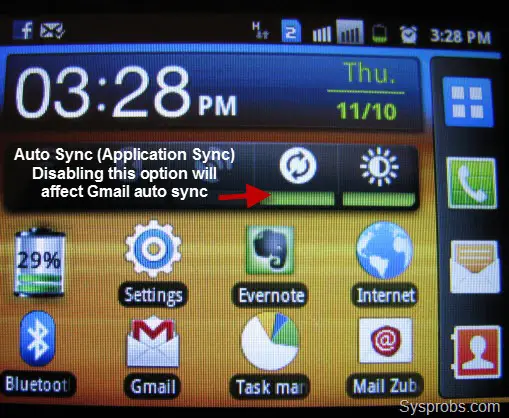
How to Fix?
Like other configured sync accounts such as MS Exchange, Facebook or Twitter, Gmail sync options will not appear under ‘Manage Accounts’ in ‘Accounts and Sync Settings’ option (what I’m seeing in my Samsung galaxy y duos pro). I think because Gmail is well-integrated email client app in Android, Gmail client is treated with ‘Application sync’ in Android.
So, if your Android phone is not receiving new emails and giving mail notification on Gmail, enable the ‘Auto Sync’ under ‘Accounts and Sync Settings’.
Press ‘Settings’ on the home screen and select ‘Accounts and sync’. Enable the tick for ‘Auto sync’ (Applications sync data automatically). By default ‘Background data’ tick should be enabled.
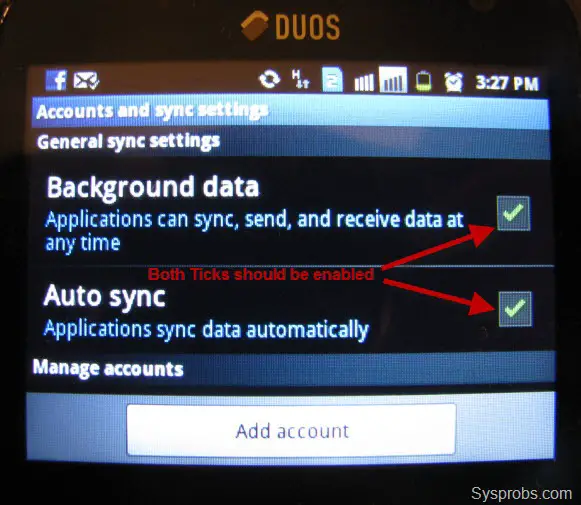
Disabling/ re-enabling above ticks and restarting the device should fix Gmail issue normally. If this step doesn’t help in fixing the issue, you may need to reset the account and reconfigure.
Enabling ‘Auto Sync’ under settings or in the power control widget from home screen fixed the issue for me. Now the Gmail app is receiving new emails automatically and giving notifications without any issues on my Samsung galaxy y duos pro. Hope you will find this simple step useful to fix the Gmail app email receiving auto sync and notification issue on Samsung Galaxy or any other Android Phones.


What’s up friends, nice piece of writing and nice urging commented here, I am genuinely enjoying by these.
I think this is among the most important info for
me. And i am glad reading your article. But wanna remark on few general things, The web
site style is ideal, the articles is really nice : D.
Good job, cheers
Hey! I just wanted to ask if you ever have any trouble with hackers?
My last blog (wordpress) was hacked and I ended up losing a
few months of hard work due to no data backup. Do you
have any solutions to prevent hackers?
This worked for me, thanks for sharing the tip. The jury is still out on battery use, though.
Hmm it appears like your site ate my first comment (it was extremely long) so I guess I’ll just sum it up what I submitted and say, I’m
thoroughly enjoying your blog. I too am an aspiring blog blogger but I’m still new to everything. Do you have any tips for first-time blog writers? I’d definitely appreciate it.
Dear sir,
my samsung galaxy s i9003 is not recieving mails automatically since may9. i dont know what changes i have made unintentionally. Now google talk is also not activating. In settings , accounts and sync,the icon sync is in red colour and is written ERROR TEMPERORILY.to be precise my gmail acvount is not syncing. I have to separately open gmail and check my mails since may. Pse help me out.
with regards
. jith
I’m experiencing the same as you do. Funny part is, I’ve two gmail accounts, the first expericing this problem, the other updates fine. I’ve tried to sync manually and according to the phone, it looks like it’s been synced, but it isn’t. Anyone have a clue?