
The print spooler is an important service on Windows computer to send the print job to the printer. It should run smoothly in order to print/send your documents to the printer. For some reasons, print spooler may stop unexpectedly and even starting the service manually may not solve the issue until the real problem fixed. This guide shows you how to fix print spooler keeps stopping automatically in Windows 10, 8.1 and Windows 7 computers.
Normally on a Windows computer, if the print spooler service stopped automatically it will not show any errors or warning messages. Also, when you try to print from MS Word, Excel or any other applications, you will not see any error messages. The only indication you can view is that all the installed printers will be shown as disabled/inactive. It will not allow to view or change the printer settings while the print spooler is not running.
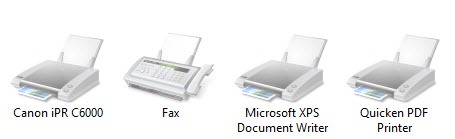
Though the screenshots of this article have been taken from the older Operating Systems, they are suitable for Windows 10 and 8.1.
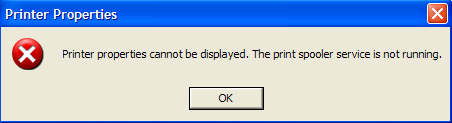
Previous Windows Operating Systems used to show following error message “The print spooler service is not running” when you try to print or open printer properties, which means something wrong with the print spooler service on the computer.
Steps to Fix Print Spooler Keeps Stopping Automatically Issue in Windows 10
Step 1: Restart the Spool service from GUI/Command Prompt
As a simple step, we will start the print spooler service from Services (or in command prompt) manually.
1) ‘Services’ can be found under Computer Management.
Type ‘Services.msc’ on the search to access it easily.
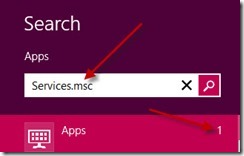
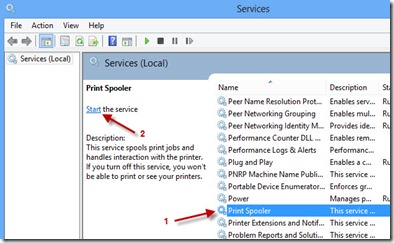
Once it opened, locate Print Spooler. I’m sure it will be in the stopped state, start the service now.
2) If you like commands, then use this method to start/stop print spooler in command prompt. We can use this method to connect other computers remotely by command prompt and perform spooler troubleshooting.
Make sure to open the command prompt with administrator privilege (Run as Administrator).
To start the print spooler, type;
net start spooler
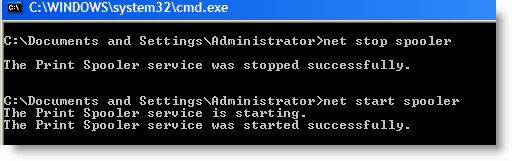
To stop print spooler, type;
net stop spooler
If the print spooler keeps stopping on Windows 10,8.1 or 7 even after starting the service as mentioned earlier, follow below steps.
3) You can try below steps if you think that print spooler is not responding and printing is not happening when the printer is physically fine (No paper jam/any error indications on printer hardware).
The below methods will help to clear the pending print jobs (print queue) and hanging spooler service.
Step 2: Clear the Spool folder
Let’s clear the print spooler files where the OS stores printing jobs temporarily. Deleting these files will allow the print spooler to start freshly and run smoothly next time.
Go to C -> Windows -> System32 -> Spool -> Printers and delete the all files inside this folder. This is the location that OS keeps the printing jobs before sending to printers. Once you deleted these files, print queue will be cleared. The same location is applicable for Windows 10 and 8.1 too.

Step 3: Set Service Recovery Options
If the problem still exists even after trying earlier steps (Assuming that the physical printer connectivity is fine and physically there are no issues on the printer), try these additional steps.
4) Make sure you have done the earlier steps.
5) Open services.msc, double click Print Spooler service and go to Recovery tab. Here we can set up what that service should do when it fails.
Select ‘Restart the Service’ in Subsequent failures field. So, it will try restarting print spooler service whenever it fails.
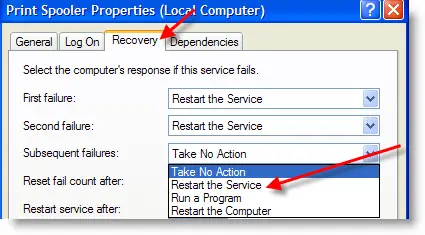
This can’t be a permanent solution if the spooler service keeps stopping. It may solve it temporarily, but better to find the real problem and fix it.
Step 4: Check the Print Spooler Service Dependencies
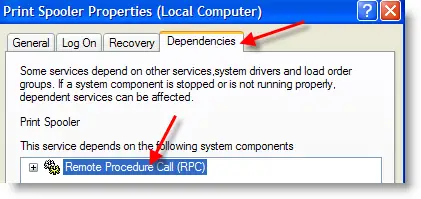
6) Go to the ‘Dependencies’ tab and make sure all depended services are started. Luckily, only one dependency service for print spooler that is Remote Procedure Call (RPC) service.
So, check the RPC service and make sure it’s already started.
Step 5: Correct Printer Driver & Remove Unwanted Printers
7) The last step which worked for me recently was the wrong printer driver installation.
Yes, if you installed completely a wrong driver to any of the network or local printer, you may frequently face this print spooler stopping issue. By default Windows OS tries to communicate with all printers very often even if you don’t print on them. When the printer and OS talk wrongly because of wrong driver installation, Windows stops the print spooler service automatically.
Try these two methods,
8) Delete all unwanted printers from your computer.
9) Make sure that all printers are installed with proper drivers (or at least with a similar model)
Once I changed to correct printer driver, it solved my problem very easily.
I’m sure one of the above methods will solve the print spooler keeps stopping automatically issue on Windows 10, 7 and 8.1. Additionally, updating the printer drivers could be another solution.







Excellent post. Clearing the print queue is the answer. This problem is rampant, as evidenced by the posts throughout the internet, and for me at least your post was the solution.
Thanks for your time.
Good Post
I cleaned out my C: >> Windows >> System32 >> Spool >> Printers and it seems to be working. I had the same error…Print Spooler not working. And I ran
net start spooler (start > run Command) and everything is working…I hope it last forever.
If you cannot clean out your C: >> Windows >> System32 >> Spool >> Printers because it is stating that you it’s still running, go into Safe Mode and delete it.
By this restriction i solved my computer problem it’s working 100%.
none of this worked for me. any other ideas? help ! ! !
This “Go to C -> Windows -> System32 -> Spool -> Printers and delete all files in side this folder” worked for me. Thank you so much!!! The print spooler would not stay in the started status
Thats great.
Thank you SO MUCH for this. It was the difference between me deleting two files or completely re-ghosting this machine.
My problem is very PARTICULAR.
Printing works from anywhere…Outlook, Word etc.
When IE8 (Win7) tried to print a PDF inside it, it stops the Print Spooler Service.
Printing from Adobe Reader works
Printing a PDF from inside Firefox works
HELP !!!!!!!!!!!!!!!!!!!!
@LEO,
I guess its something wrong for IE8 add-on for adobe. Try to update or reinstall the adobe plugin or add-on for IE8.
Good luck.
This may be because of virus also …
I tried to start the services but it again stops…
I tried one step to recover this …
stop the spooler services and replace the spoolsv.exe and spools.dll file from any another PC…
and replace it into your PC…
This works for me…
Or else please format ur PC and install a good antivirus before you install any other software….!@!
This may be because of virus also …
I tried to start the services but it again stops…
I tried one step to recover this …
stop the spooler services and replace the spoolsv.exe and spools.dll file from any another PC…
and replace it into your PC…
This works for me…
Or else please format ur PC and install a good antivirus before you install any other software….!@!
Great, replacing the spoolsv.exe & spools.dll files worked for me on XP Pro SP3.
Thank you sooooooooooooooooooo much!!!!!!!!!!!!
There is a FIXING TOOL for this problem which really works .. It is on the microsoft site (fix it) but you need to re install the printer again……
Great post friend !!! Clearing the print queue was solution !!!
Thanks and god bless you !!!
Salute
Thanks a lot chief. Clearing the printers folder worked for me too. God bless
such a nice tips. i really useful to us
you saved me! I was about to break my head over this issue and all the other posts out there seem to point elsewhere for solutions. but deleting the printer files worked like a charm!
thank you so much for finding this solution and posting it online for us! a lot of good karma for you!
Great post friend !!! Clearing the print queue was solution !!!
Thanks and god bless you !!!
Thank you SO MUCH for this
by seow quan
Went to the printer file in system32/spool and it was already empty. Spooler turns off every time I try to reload the driver. Any thoughts?
Excellent article about the print spool issue! It helped me with one system I had but on another one I had to troubleshoot wasn’t as easy! Luckily I used the utility from http://www.printerproblemsolver.com and it helped fix my other issues! It also takes care of print spool stuff too, but I found it afterwards lol
Again, great article!
Thank You,
It worked for me, Thank You
There was nothing in my PRINTER folder to delete. I have tried many things I have seen on the net and nothing seems to work. The spooler will not stay running long enough to reload drivers no matter what I do. Before I uninstalled the Canon MP470 through Add/Remove there was no printer listed in Printers and Faxes even though it was working fine for several years. I can turn the spooler on and it will turn back off very shortly or when I try to reload the driver even with the printer disconnected. I am glad to see that this solution has worked for others but it has not worked for me. Any other suggestions?
Thank you. Much appreciated. It worked for me too… 🙂
@Keith
Me to /-: wont stay up when I load a new printer.
It stop every time …..
Any one ??? Help us solve this .
this is exeptionally great article this solution works great thanks for the sharing such easy solutions
our net printer not connect.
due to error spooler. please advice how can solve.
Great Post, it worked for me too on Win7 Ent 64bit. Thanks a lot…!!!
If there are only subfolders in the \windows\system32\spooler folder should I delete them?
It works perfectly for me. I clear all spool and it works again. I hope it last foreverrrrr! Thanks alot!
Really Awesome…..Readlly….