Convert Mac dmg to iso in Windows

Convert Mac dmg to iso in Windows

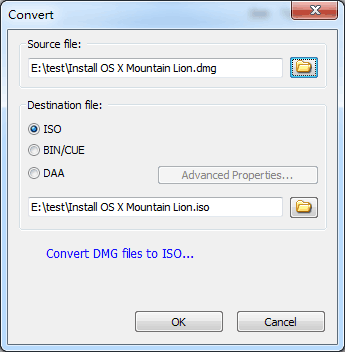
By any chance if you need to convert Mac dmg to iso in windows environment, then below method will be helpful. DMG is an image format used in Mac OS X. Windows OS and its most of the software do not support dmg. Once it is converted to iso then you can write it on CD or DVD in Windows.

We will use a small program called ‘dmg2iso’ for this conversion. There are several methods available on internet but unfortunately non of them worked for me. dmg2iso did the job quickly and correctly. So I decided to share it here.

How to Convert Mac DMG to ISO in Windows? Follow the steps

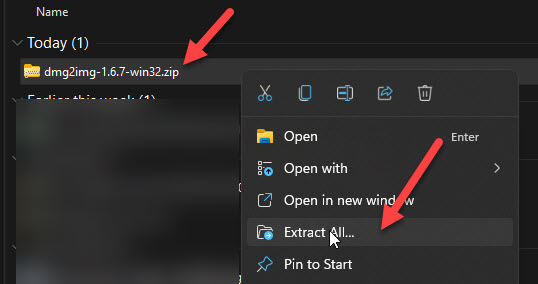
1) Download dmg2iso from official site here

2) Installation not required, just run the below command after extraction. ( Make sure to configure path in Windows OS)

dmg2img < Source file.dmg> <destination file.iso>

3) The original conversion with correct file names starts as below.
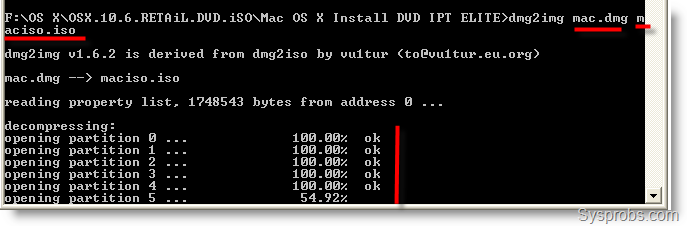
Convert Mac dmg to iso in Windows At the end, you will get a successfully converted ISO from DMG in Windows. This ISO can be easily mounted using any mounting software or attached to VMware or VirtualBox as CD ROM drive.

Sorry, Comments are closed for more than one year old posts.

Comments

  1. Hehe seems to be your doing a lot of work with MACs :D

    • Yes Pubudu, Its bringing more visitors to my blog. It’s a good niche. But, still I cover Windows 7, VMware, VirtualBox. Your Blog is great, I’m your regular reader and observer. Good Luck.

    • mine says ‘dmg2iso’ is not recognized as an internal or external command,
      operable program or batch file.
      please help

  2. yudicrust says:

    Thanks u for this information….

  3. the hardshutter says:

    i try to do this guide but in win.7 is dosent exist the run button in start menu. where i haft to type this:
    dmg2img and how to configure dmg2dmg in win.os

  4. in dos or like windows calls it command prompt in the programs list.
    if you cannot find it then click start and type cmd good luck!!!

  5. umar hyatt says:

    i have been trying to follow the steps mentioned many times but i have failed. one thing that i did before attemting this was that i changed the dmg file name it was a long name so i gave it a short name. help me plz i am stuck on this step on the way to mac osx lion. i already have snow leopard with me

    C:\mac>dmg2img snow.dmg snow.iso

    dmg2img v1.6.2 is derived from dmg2iso by vu1tur (to@vu1tur.eu.org

    snow.dmg –> snow.iso

    reading property list, 888454 bytes from address 3815701944 …

    decompressing:
    opening partition 0 … ERROR: Inflation failed

    • please read this: http://filext.com/info/showthread.php?t=160&page=9
      i think its the solution.

    • Dear all, in my windows XP, i just type “C:\mac\snow.dmg –> snow.img” in “run” textbox on start menu, then windows ask me to select program from list to open. I just browse to the path which content “dmg2img” application file and press Enter… It run for a few second, then i have “snow.img” file. After all, you can use Ultra ISO to convert img to ISO…
      Good luck!

    • open dmg with 7-zip and extract dmg that is within the original dmg. convert the inner dmg . worked for me

  6. for you all having problems i’m willing to bet they’re mainly directory/location specific ones. you’re going to have to point the cmd prompt to the dmg program (ex. mine was on my desktop under another folder so in order to execute the command i had to type C:\Users\Desktop\hackintosh\dmg2img then pointed that to C:\Users\Desktop\os’s_iso’s\10.6\Mac OS X Install DVD.dmg C:\Users\Desktop\os’s_iso’s\10.6\osx.iso i made the output file name just simply osx.iso and worked flawlessly.

    • Exorcist says:

      Dude see i have done all this…..u know this ends up with input file cannot be opened.
      I even tried dmgextractor.jnlp which created an iso file . But man that iso file after was just unable to open. FUCK :’(

  7. thx for this..

  8. pcloonetic says:

    This blog is great!!! Keep up the good work! ;-)

  9. @exorcist you most likely have a bad dmg to begin with bro. Sorry to say but I’ve had it happen before too then when I find a clean copy it works like a charm. Try finding a fresh copy maybe.

    Mike

  10. Sweeeet, this was the only program that worked for me. Thanks for the article, and major thanks to whoever wrote the software, you’re a life saver!

  11. Well, there is another solution if you want to simply extract from a .dmg file without converting to ISO, see the DMG Extractor on http://www.dmgextractor.com. No technical knowledge required.

  12. my sistem not supportting dmg file this is softwere file pls help me

  13. Alexandra says:

    @backersha you definitely have to try the DMG Extractor, works on any Windows PC and it’s free edition is a powerful tool, you can download it from here: http://www.dmgextractor.com/free-download/ . The DMG Extractor will run on any Windows XP, Vista or Windows 7 computer, in 32 or 64-bit mode.
    Hope it helps!

  14. Thank you for this easy yet powerful post!

  15. SierraBear says:

    Set up a directory as such C:\mac\convert. Place your source file *.dmg in the mac folder. Place your dmg2iso.exe file in the convert folder.
    Open an Administator Command Prompt and type: C:\mac\convert\dmg2iso C:\mac\*.dmg C:\mac\*.iso
    Voila, conversion will start.

    • Richard K. says:

      An easier way to do this would be to put your .dmg file into a folder, and put all the dmg2img files in the same folder, open cmd and cd into that folder, and then run dmg2img whatever.dmg whatever.iso and it will work like a charm.

  16. SierraBear says:

    Mount and browse your new .iso file easily with Virtual CloneDrive.
    http://www.slysoft.com/en/virtual-clonedrive.html

  17. Regen2100 says:

    Works great, and thanks for the Open With… shortcut, saves some typing… and time…

  18. crappy program, i get this when i
    < was unexpected at this time
    waste of my time

  19. you can just drag and drop with this program. just grab your .DMG and drop it onto dmg2iso.exe and just wait.
    by far the easiest way to convert dmg to iso

  20. Great tool! Thanks for posting the write up! Wish I found this before the other posts that let me down the wrong path wasting my time!

  21. Thanks man, it works better than any thing ive tried.

  22. it dosnt work for me. it says missind dill & it dmg2img not dmg2iso

  23. i tried the syntax many times to convert galaxy on fire 2 mac os game….. but totally a failure….. the prog shows error msg…

  24. Thanks!! works great!!

Sorry, Comments are closed for more than one year old posts.